

Last updated: October 9, 2026
The Figma agent is an AI assistant built into Figma Design that edits real design layers on the canvas using your components, styles and variables; it became generally available on October 6, 2026, works on every plan, and now spends the same AI credits as Figma Make.
TL;DR
Use the Figma agent to work inside a design file: generate screens from your design system, make bulk edits, rename layers, fill in content, get design feedback.
Use Figma Make to turn a prompt or a design into a working, clickable app with real code you can publish to a URL.
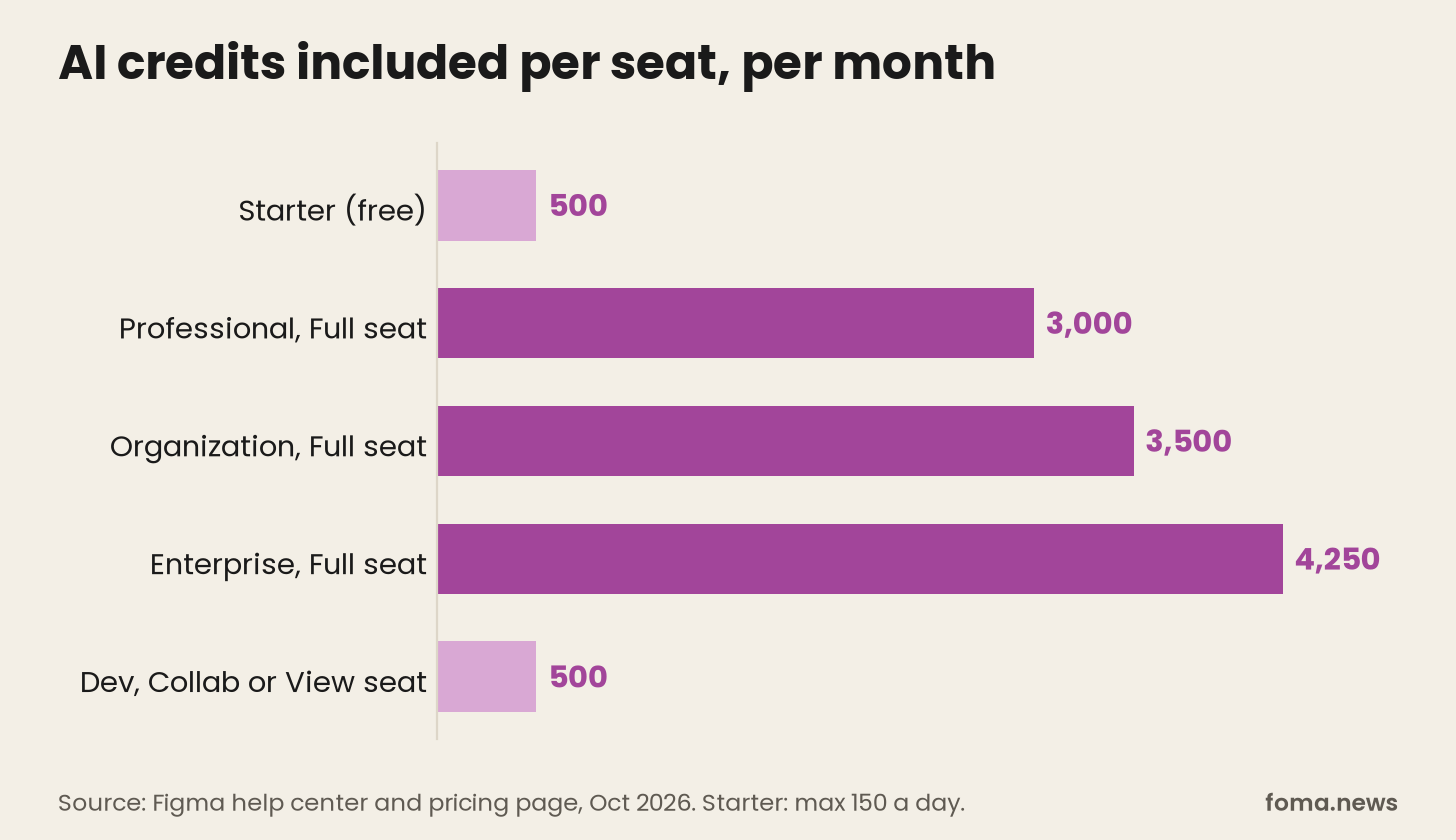
They share one AI credit balance. A Full seat includes 3,000 credits a month on Professional, 3,500 on Organization and 4,250 on Enterprise. Starter and Dev, Collab and View seats get 500.
What GA changed: faster responses, file search in chat, library guidelines, generative plugins out of beta, and credit billing.
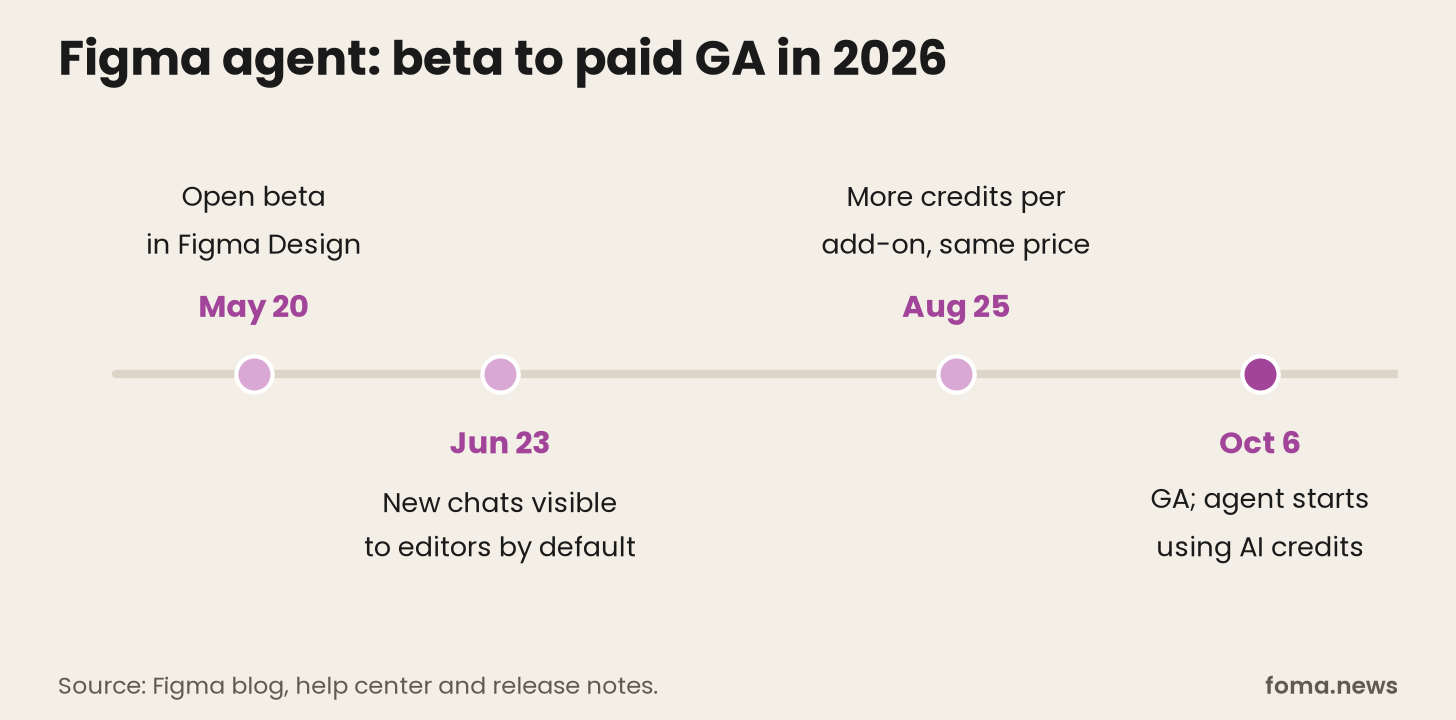
Figma launched the agent as an open beta on May 20. Before that, it had opened the canvas to outside agents through its MCP server, which FOMA flagged back in March. The agent is Figma's own answer: an agent that already knows your file.
What is the Figma agent?
You select a layer and press Cmd or Ctrl + Enter, or open Agents in the left rail for a chat sidebar (Figma's help center). Then you ask. Figma's launch post pitches three jobs:
Explore: "give me 3 style options for this design," with your own components as the starting point.
Automate busywork: swap a component across screens, convert a flow to dark mode, replace placeholder copy.
Look after the design system: document components, standardize names, update descriptions in bulk.
You can connect a library and @-mention specific tokens, variables and components to steer it. You can run several prompts at once on different frames. It also uses skills, MCP connectors and web search.1
It does not yet do prototyping, vector drawing or icon creation; Figma lists those as coming soon. It won't export assets for you.
What changed when the Figma agent went GA?
Per the October 6 release notes:
Speed and search: lower latency, and the agent can search for files across Figma, FigJam and Slides and pull them into the chat.
Library guidelines: you upload markdown files with rules and anti-patterns to a library, and the agent reads them on every prompt that uses that library.
Shared view: you can watch teammates' agents work live on the canvas.
Generative plugins: out of beta. You describe a repeatable task and the agent builds a plugin for it.
Skills: the agent can help brainstorm, create and publish custom skills, and custom skills now work on the free Starter plan.
Billing: "The Figma agent uses AI credits as of Oct 6."
Figma agent vs Figma Make
Same credit pool, different output. The agent produces design layers inside a design file. Figma Make produces code: an interactive app or prototype you can click through, edit as code, give a backend, and publish to a URL.
Figma itself frames them as two halves of one loop. Start with the agent to work out flows, states and copy as layers. Send that to Make to see how it behaves. Bring the result back into the design file. Or go the other way: start in Make, copy frames into Design, refine them with the agent, send them back.
So the choice depends on the question you're asking:
"What should this look like?" Agent. It works in your file, with your library, and you can grab the layers and edit by hand.
"How should this behave?" Make. A clickable app answers questions a static frame can't.
"Can I ship this as a small site or internal tool?" Make, which can publish.
One access difference: the agent is available on all plans, while Make is for Full seats on paid plans, though Figma offers a way to try it on other seats and plans.2
Figma agent pricing: how many AI credits do you get?
The agent has no separate price. It spends AI credits, and every seat includes a monthly allowance (Figma's help center):
Starter (free): 500 credits a month, capped at 150 a day.
Professional Full seat: 3,000 a month. Listed at $16 a month on Figma's pricing page.
Organization Full seat: 3,500 a month, at $55 a month billed annually.
Enterprise Full seat: 4,250 a month, at $90 a month billed annually.
Dev, Collab and View seats: 500 a month on any paid plan.3
Seat credits reset monthly and don't roll over. Past them, an admin can buy a monthly credit subscription, turn on pay-as-you-go up to a spending limit, or both.4 Figma doesn't publish a per-credit price; admins see it in the dashboard.
How many credits does one prompt cost? Figma won't give a number, which is the least fun answer in pricing. It depends on how complex the task is, what the agent does, and how much context you attach. Figma's own cost advice is useful:
Write a precise first prompt. Vague prompts cost you in corrections.
Attach only what the task needs.
Start a new chat for each task. Long chats carry their whole history, so even simple prompts get more expensive.
Turn repeated jobs into generative plugins. Building one costs credits; running it afterwards costs zero.
Ask product questions to Fig, Figma's support chatbot, which is free.
How to try the Figma agent
Open a design file where you have edit access and a Full seat. In your own drafts, any seat can edit.
Select a frame, press Cmd or Ctrl + Enter, and describe one specific change.
Connect your team library and add guidelines, so outputs follow your rules.
Write a skill for anything you explain more than twice. FOMA's skills vs MCP explainer covers why that pattern works.
Check your balance under Main menu, then AI balance.
Who is the Figma agent for?
Teams with a real design system get the most from it, because the agent's edge over outside tools is that context. Design system maintainers should look first: bulk documentation, renaming and component updates are exactly the dull, precise work it's good at.
Solo designers on Starter can try it, but 150 credits a day doesn't go far on long chats. If what you really want is a working prototype, start in Make.
So, Figma agent or Figma Make?
You want to know which Figma AI tool to open. Open the agent when the work is design: exploring options, applying your system, or making the same edit across many screens. Open Make when you need something that runs: a clickable prototype, an internal tool, or a small site. Both draw on the same credits, so the real cost question is how carefully you prompt, not which tool you pick.
Notes
Figma's help center lists the supported features, including skills, MCP connectors, web search, plugin generation, shaders, motion, bulk content, image editing and comment review. Prototyping, vector and draw tools, icons and slots are "coming soon"; asset export and data visualizations are not supported (help center). Since June 23, 2026, new agent chats are visible by default to people with a Full seat and edit access to the file.
Seat rules for the agent: Full seats with edit access can make edits; View, Dev and Collab seats, or view-only access, can chat but not edit; anyone can edit their own drafts (help center). Make is "available for Full seats on paid plans" (Explore Figma Make).
Seat prices from Figma's pricing page, October 9, 2026: Professional Dev seat $12 and Collab seat $3 a month; Organization Dev $25 and Collab $5; Enterprise Dev $35 and Collab $5. View seats also have the 150-credit daily limit (help center).
Figma introduced paid credit add-ons in March 2026. On August 25, 2026 it raised the credits in each add-on at the same price: 2x on Professional and 1.6x on Organization and Enterprise (AI credit updates FAQ).